
How to Connect Your Australian Bank Account to Claude and ChatGPT
A step-by-step guide to connecting CommBank, ANZ, NAB, Westpac and 100+ other Australian banks to Claude and ChatGPT through Open Banking (CDR) and Redbark's MCP server.

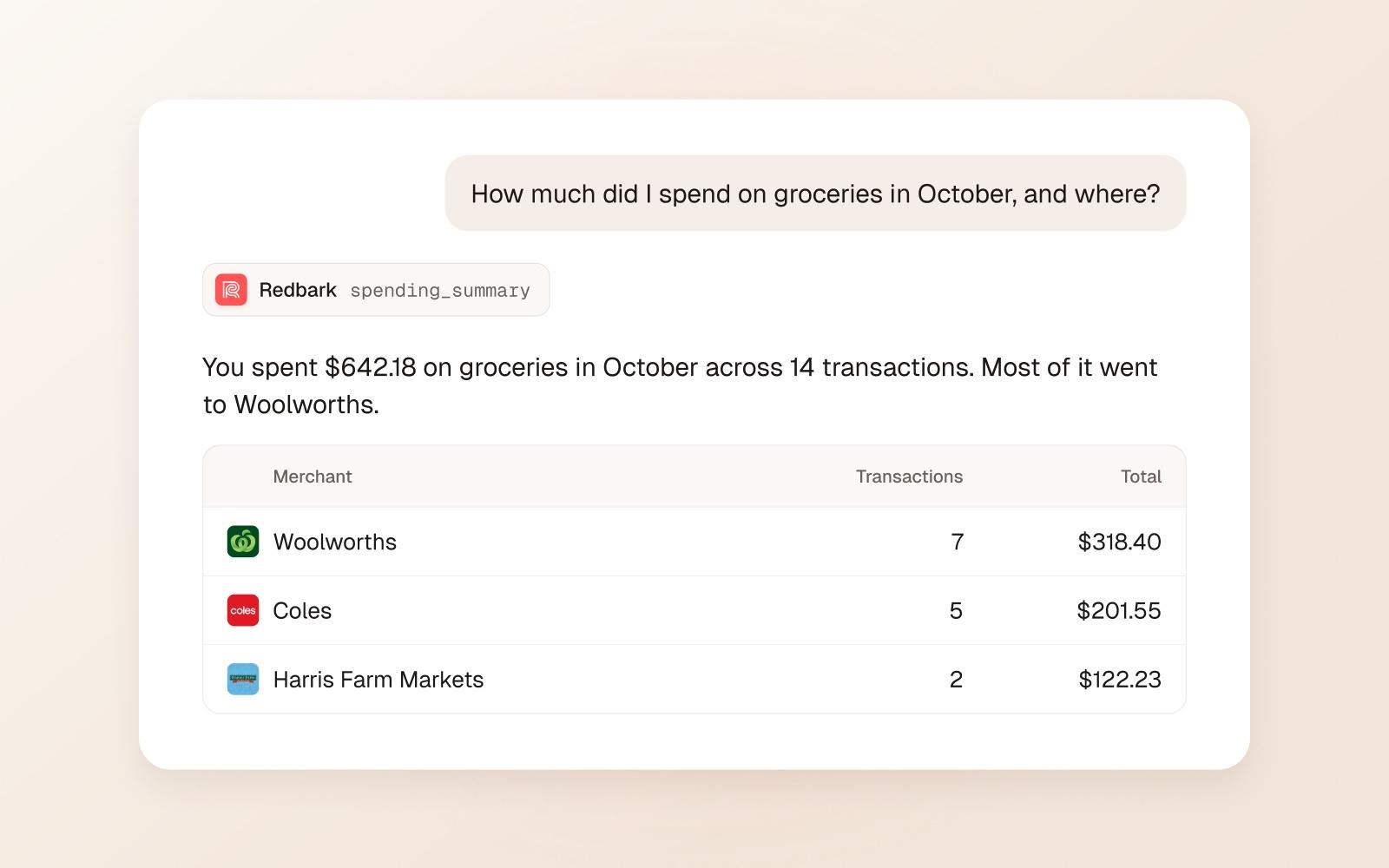
You can connect an Australian bank account to Claude or ChatGPT by linking your bank to Redbark through Open Banking (the Consumer Data Right, or CDR), then adding Redbark's MCP server, https://mcp.redbark.com/mcp, as a connector in your AI assistant. You sign in once with OAuth, choose what the assistant may do, and it reads your accounts, balances and transactions live when you ask a question. It works with CommBank, ANZ, NAB, Westpac, Macquarie, Up, ING and 100+ other Australian banks, and the assistant can never move money.
This guide covers the Australian setup end to end: the bank consent, the Claude connector, the ChatGPT connector, other AI tools, what to ask, and how to switch it all off. If you want the background on what MCP is and why we built it, read Manage money with AI using Redbark MCP first.
Why connect your bank account to an AI assistant?
Most banking apps answer one question well: what is my balance right now. Everything else means exporting a CSV, opening a spreadsheet and building a pivot table.
An AI assistant with live access to your accounts can answer the questions you actually have:
- "What did I spend on groceries last month, and at which supermarkets?"
- "Which subscriptions charged my credit card in the last 90 days?"
- "How much is in my offset account compared with this time last month?"
- "List every transaction over $500 across all my accounts this year."
Because the data is fetched when you ask, you can follow up a week later and get current numbers. There is nothing to export or paste.
How does it work?
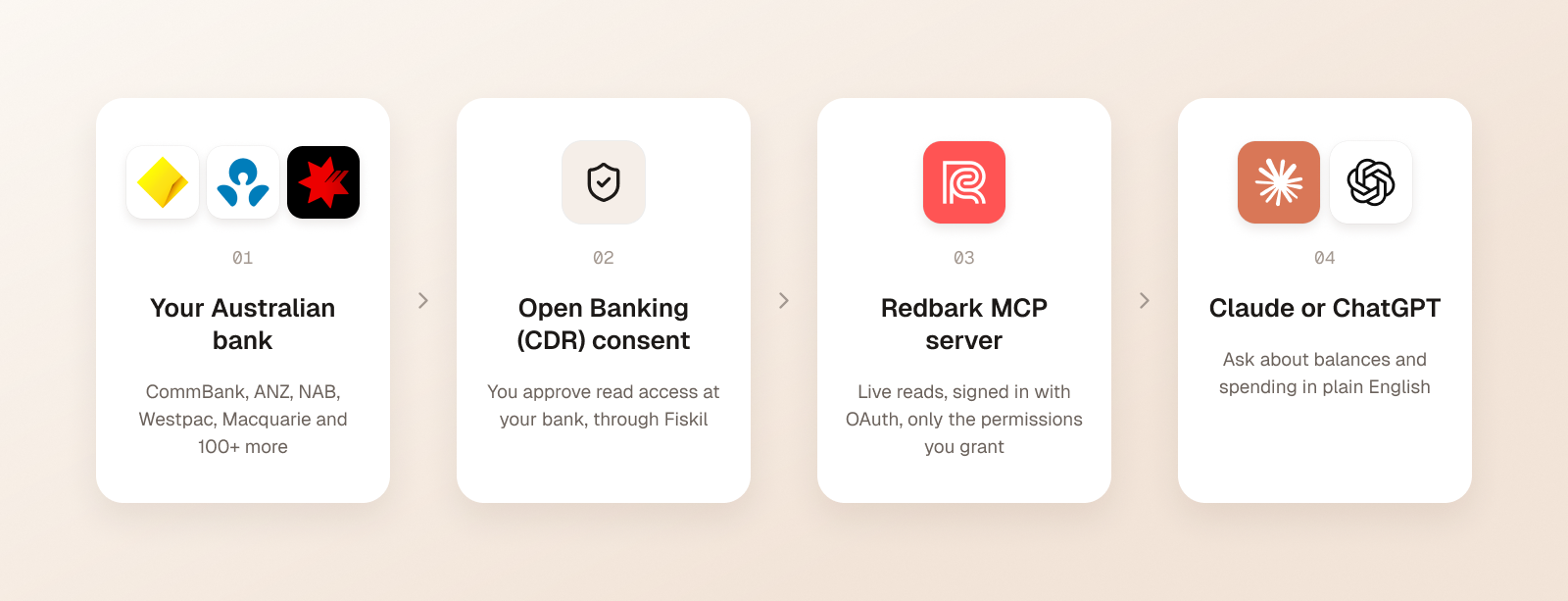
There are three parts:
- Your bank shares data under Open Banking (CDR). You approve a CDR consent on Fiskil's consent screen and log in with your bank directly. Redbark operates as a CDR Representative of Fiskil, an accredited data recipient. Nobody except your bank sees your banking password. Read more in our guide to Open Banking (CDR).
- Redbark runs an MCP server. Model Context Protocol is the open standard AI tools use to call external services. Redbark's server at
https://mcp.redbark.com/mcpexposes your accounts, balances and transactions as tools the assistant can call. - Your assistant signs in with OAuth. Claude and ChatGPT register themselves with Redbark and send you to a consent screen. You approve the permissions, and there is no API key to copy or store.
When you ask a question, the assistant picks a tool, Redbark reads the data from your bank, and the answer comes back into your chat.
What you need before starting
- An Australian bank account with one of the 100+ supported institutions
- A Claude or ChatGPT account (see each section below for plan details)
- A Redbark account on the Developer or Professional plan. MCP access is included in both, and every account starts with a 7-day free trial, no credit card required. See pricing for current plans.
Brokerage holdings and trades need the Professional plan or an active trial.
Step 1: Connect your Australian bank to Redbark
- Sign up for Redbark and click "Add Connection".
- Choose Australian Banks. This opens Fiskil's consent screen.
- Select your bank, log in with your bank directly, and approve the CDR consent.
- You return to Redbark and your accounts appear in the dashboard.
The whole flow takes about a minute. CDR consent lasts up to 12 months, and Redbark emails you about 90 days before it expires. How CDR consent duration works has the detail.
You can add more banks the same way. The assistant sees every account you have connected, so one question can cover your CommBank everyday account, your Macquarie offset and your ING savings at once.
Step 2: Add Redbark to Claude
Redbark is listed in Claude's connector directory. If you find it there, click Connect and skip to the OAuth consent below. You can also add it yourself as a custom connector, which works the same way.
On Claude Pro or Max:
- In Claude, open Customize > Connectors.
- Click + Add, then Add custom connector.
- Enter the name
Redbarkand the URLhttps://mcp.redbark.com/mcp, then click Continue. - Leave the OAuth client ID and secret blank. Redbark supports dynamic client registration, so Claude sets up its own client.
- Click Add, then connect and sign in to Redbark.
On Claude Team or Enterprise: an owner adds the connector under Organization settings > Connectors. Members then connect it from Customize > Connectors.
Anthropic's free plan allows one custom connector. Custom connectors work across claude.ai, Claude Desktop, Cowork and the Claude mobile apps, because the connection runs from Anthropic's side. Anthropic's custom connectors guide has screenshots.
Approve the consent screen. Redbark shows the app asking for access and the permissions it wants. Read access is enough to ask questions about your money. Only grant write permissions if you want Claude to set up syncs or rules for you.
To use it in a chat, click the + button at the lower left of the message box, choose Connectors, and make sure Redbark is switched on.
Step 3: Add Redbark to ChatGPT
ChatGPT adds MCP servers as custom connectors through Developer Mode. Availability depends on your ChatGPT plan, and on Business, Enterprise and Edu workspaces an admin controls it. OpenAI moves these menus from time to time, so check OpenAI's connector guide if a label below has changed.
- In ChatGPT settings, open the apps and connectors section and turn on Developer Mode under advanced settings.
- Create a new connector (OpenAI's current guide calls it adding a custom MCP server).
- Set the name to
Redbarkand the URL tohttps://mcp.redbark.com/mcp?toolsets=chatgpt. - Set authentication to OAuth, accept the warning about custom servers, and create the connector.
- Sign in to Redbark and approve the consent screen.
The ?toolsets=chatgpt part of the URL gives ChatGPT a curated set of tools: account and balance reads, transaction search, spending summaries, sync diagnostics, connecting a bank and running an existing sync. It does not grant any extra permissions.
In a new chat, select Redbark from your tools (or type @ and pick it), then ask your question.
Other AI tools that work
The same server works with any client that supports remote MCP over Streamable HTTP. We have tested setup guides for:
- Claude Code:
claude mcp add --transport http redbark https://mcp.redbark.com/mcp, then run/mcpto sign in - Cursor, Windsurf, VS Code Copilot, Zed and Gemini CLI, via their MCP config files
- Cline, Warp and Raycast
- Goose and n8n, which use a Redbark API key instead of OAuth because they run without a browser
The full list is on the MCP page.
What can you ask once it is connected?
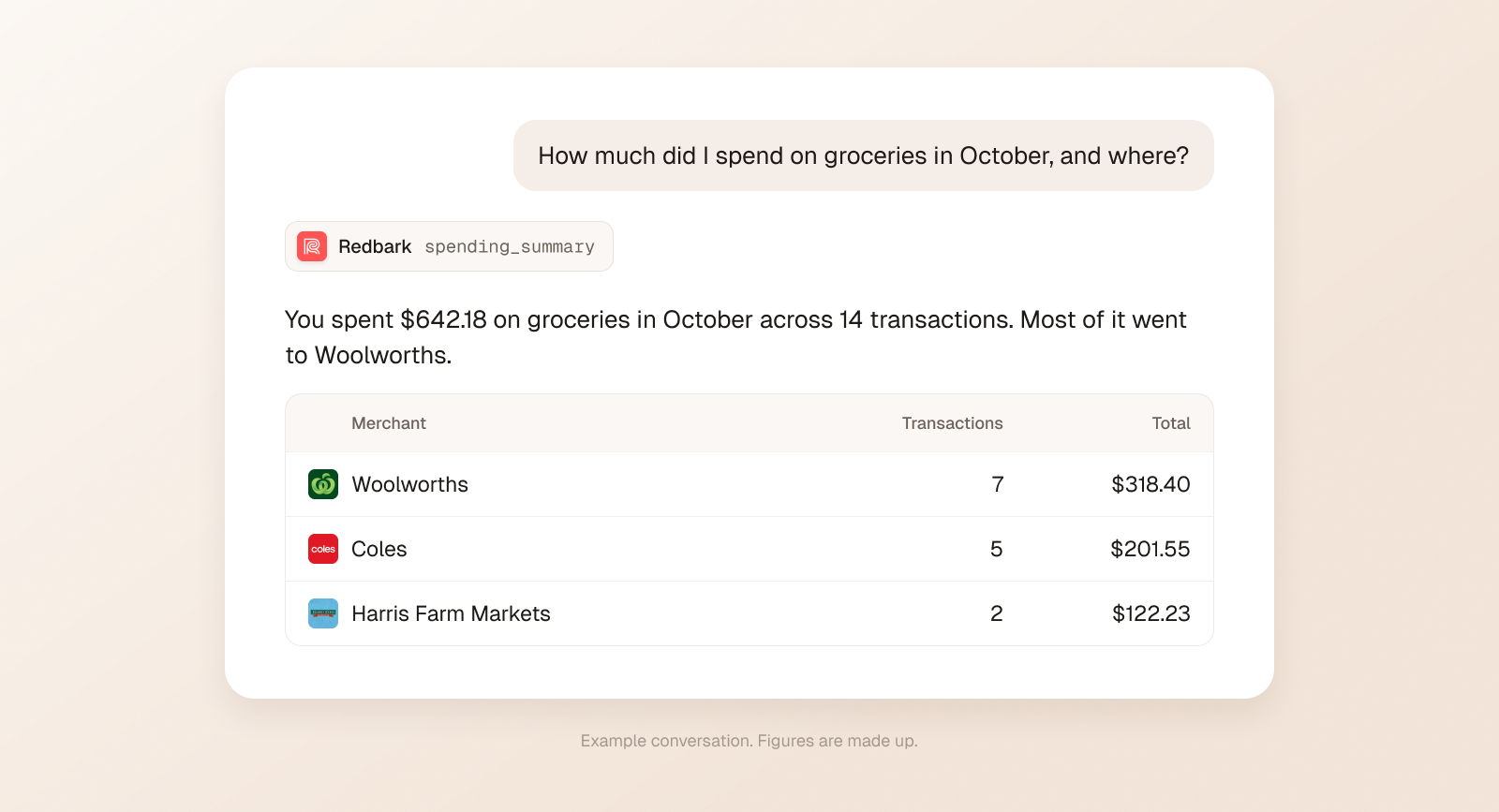
Start simple to check it works: "What bank accounts do I have connected?" Then try questions like these:
What is my total balance across all my accounts?
What did I spend on groceries this month, broken down by store?
Show my largest ten transactions in September.
How much did I pay in bank fees this year?
Find every payment to my energy retailer and chart them by month.
Show my brokerage holdings and unrealised gains.
The assistant chooses the tools itself. For balances and spending it usually calls account_overview or spending_summary, which read across your accounts in one go. If you have granted write permission, you can also say things like "Create a sync from my everyday account to my Budget sheet and run it now."
What can the assistant access, and what can it not do?
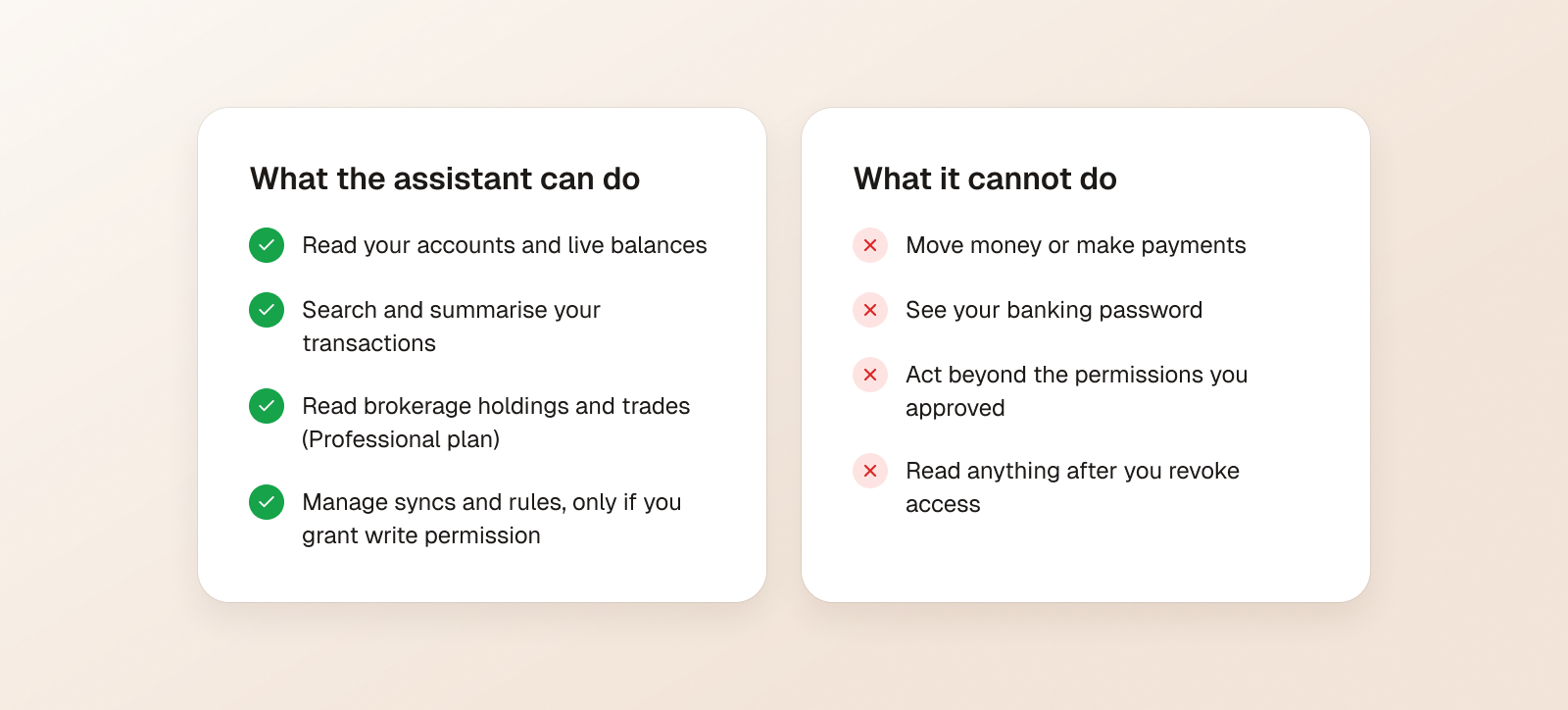
The assistant can only use the permissions you approved on the consent screen:
- Read access covers connections, accounts, balances and transactions. Brokerage reads need a separate permission.
- Write permissions are separate and opt in: connections, syncs, destinations, categories, rules and event destinations each have their own.
Write tools change Redbark configuration, such as syncs and rules. They do not touch your bank. No tool can move money, make a payment or see your banking password. Open Banking (CDR) data sharing is read only by design.
How private is it?
Redbark fetches your banking data live when the assistant calls a tool. Reads may pass through a short-lived, encrypted cache, and banking payloads are not written to our primary database or logs. How Redbark handles your data explains the details.
Once a tool result reaches your chat, it is part of that conversation. Anthropic or OpenAI then handle it under their own terms, including how long chats are kept and whether they are used for training. Check your assistant's data controls if that matters to you.
How to disconnect or revoke access
You have three levels of control:
- Turn the connector off in a chat. The assistant cannot call Redbark in that conversation.
- Revoke the AI app in Redbark. Go to Settings > API & MCP and revoke the connected app. Its tokens stop working straight away. To change permissions, disconnect and reconnect, then grant what you need.
- Withdraw your CDR consent. Use the Consents page in Redbark or Fiskil's consent dashboard. This stops data sharing at your bank for every app, not only your AI assistant.
FAQ
Can I connect my CommBank, ANZ, NAB or Westpac account to ChatGPT?
Yes. Connect the bank to Redbark through Open Banking (CDR), then add Redbark's MCP server to ChatGPT as a custom connector with the URL https://mcp.redbark.com/mcp?toolsets=chatgpt.
Does Claude or ChatGPT see my bank login? No. You log in on your bank's own page during the CDR consent. Neither Redbark nor the AI assistant ever sees your banking password.
Can the AI move money or make payments? No. Open Banking (CDR) sharing is read only, and no Redbark tool can make a payment. Optional write permissions only change Redbark settings such as syncs and rules.
Do I need an API key? Not for Claude or ChatGPT. Both sign in with OAuth in the browser. API keys are only for headless tools like n8n.
Which Redbark plan do I need? MCP access is included on the Developer and Professional plans, and during the 7-day free trial. Brokerage data needs Professional or an active trial.
Does it work with New Zealand or US banks too? Yes. The same MCP server covers Australian, New Zealand and United States bank connections. NZ and US banks use different providers, so the consent step differs.
Is my data up to date? Yes. Data is read when the assistant asks, not from a nightly export, so a follow-up question later returns current figures.
If anything does not work, the MCP setup docs and troubleshooting guide cover the common errors, or email support@redbark.com.